

Honolulu, Hawaiʻi

Clinical software for infectious diseases practices, built by an ID physician.

Our first product, IDRounds, takes a consulting physician from the Epic face sheet to a claim ready for the biller to file: capture on the phone, one-tap rounding, AI-drafted ID consult and follow-up notes, billing rules built in, and a portal for the biller. It runs our own practice every day, and we are now preparing it for other practices. IDRounds also has a home infusion module, built and ready for a practice to switch on. Our second product, Answering Service, is being built and is not taking patient calls yet.

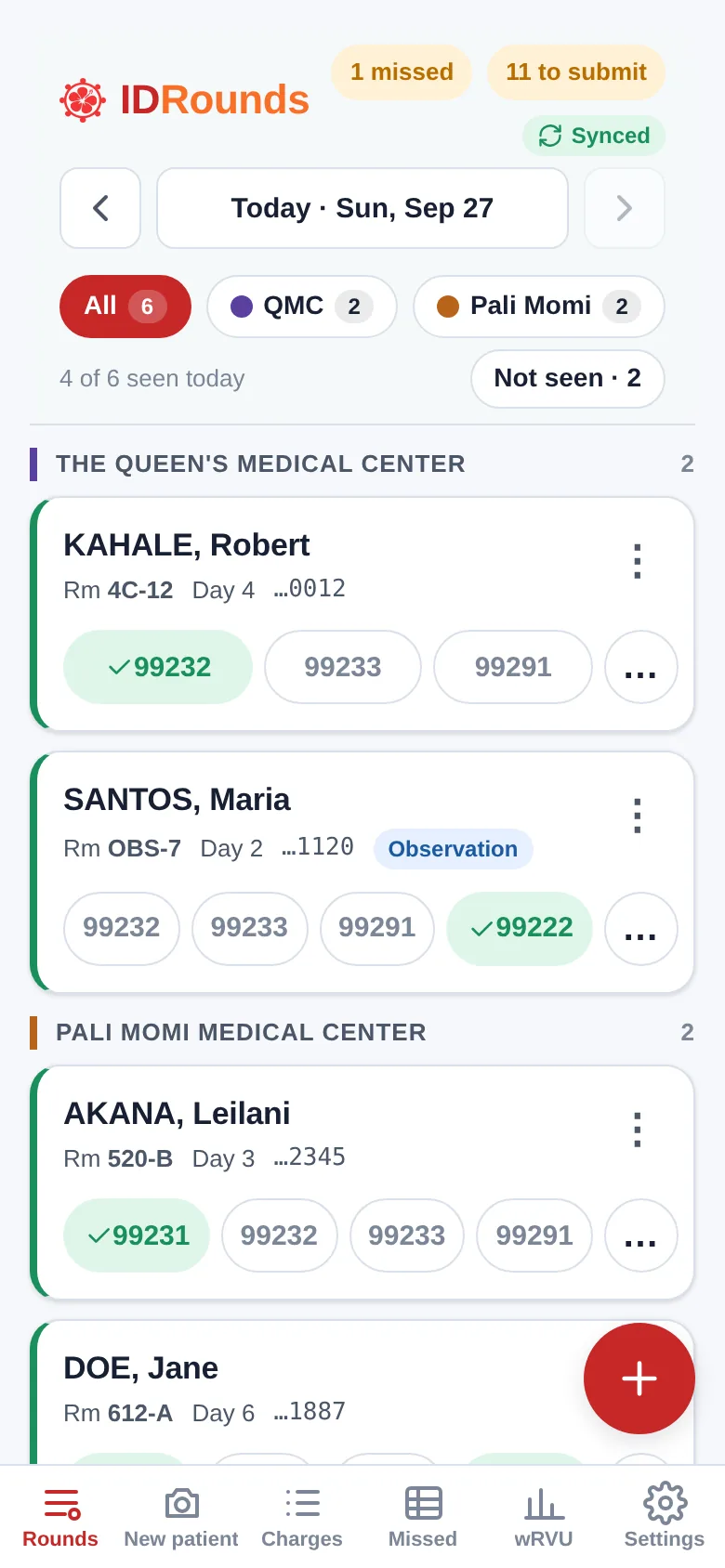
IDRounds census on a phone for Mon, Sep 28: 5 of 7 patients seen today, grouped by hospital, each with one-tap visit codes
The rounding census in IDRounds

Live

Inpatient charge capture, documentation and billing for consultants who round at several Epic hospitals. It runs as an app on the physician's phone, a portal for the biller, and a locked-down page for hospital workstations. app.idrounds.ai

  1. 1 · New consult Photograph the face sheet Name, MRN, date of birth, admit date, hospital and insurance fill in.
  2. 2 · Rounds Tap the visit, or dictate the note One tap per patient, or a drafted note whose visit code the software picks from its grades.
  3. 3 · Submit Send the day's batch A readiness check catches what the biller cannot fix alone.
  4. 4 · Billing The biller files by stay One claim per hospital stay, with questions sent back to the phone.

Face-sheet capture

  • Reads Epic face sheets on the phone itself, with no signal needed.
  • Tuned to the Queen's, Hawaiʻi Pacific Health, Adventist Health Castle and Hilo Benioff layouts, including ʻokina and macrons in names.
  • Optional AI reading, first by default once it is switched on, with every page of a multi-page sheet read together.
  • Detects the hospital and warns about a likely duplicate patient before it becomes a double claim.
  • Insurance belongs to each admission, up to three plans in order, and a readmission keeps the details the new sheet left blank.
  • Available to switch on: a second AI reader, from another company, reads the same pages, and only a field the two read differently gets a note.

One-tap rounding

  • Census grouped by hospital, showing who is still to be seen today.
  • One tap per patient on the visit code, critical care included, and Undo on every tap.
  • Mark a patient not seen, or sign off when you stop following; the days already seen stay on the record.
  • Sign-off can put the patient on one follow-up list, emailed to the office every Monday morning.
  • A reminder asks "still following?" when a patient has gone three days without a visit.
  • Rounding, charges and new patients work offline and sync when signal returns.

AI scribe

  • Dictate or type; the note drafts in the ID consult and follow-up format we use on our own rounds.
  • Dictation listens for nearly 1,000 ID terms, such as drug, organism and test names, plus a list of your own words.
  • Vital signs dictated in shorthand ("T max 38.2, BP 118 over 72") are written on one line at the top of the exam. The drafting AI is told to mark a number it can't make out as unclear rather than guess, and you check every number before you sign.
  • A follow-up builds on your earlier notes on the stay, adding a dated line of interval history for the day.
  • Cultures, imaging, allergies and problems carry forward unless a later line updates them; only a very long stay trims the oldest entries, which the earlier notes still hold.
  • Review on the phone, copy into Epic and sign. On a day with no visit yet, the note's code starts the charge.
  • The note's diagnoses update the day's charge in one step, in the order the note lists them; the visit code you entered stays yours.
  • A covering physician can draft follow-ups on the patients they cover during their call.

Coding you can defend

  • Medical decision making graded against the AMA 2023 table, with the words from your dictation, or from the note you photographed, that support each grade.
  • The software picks the visit code from the grades. The AI never does.
  • Every diagnosis checked against the full ICD-10-CM billable code set for its date of service.
  • A diagnosis in the note with no billable code gets up to four suggested codes that fit its words. You pick one with a tap; none is picked for you.
  • Photograph a finished note to check its level, or a problem list to get its ICD-10 codes.

Payer rules built in

  • One visit per patient per day enforced, and a second initial visit on the same stay flagged.
  • Consult codes flagged for Medicare and QUEST; G0316 or 99418 checked against the payer; observation place of service.
  • The G0545 ID complexity add-on offered wherever it applies.
  • Diagnosis fixes applied across a whole stay in one step.
  • Charges on a stay with no diagnosis can take the billable codes from your own notes: that day's note, or your latest earlier one, each line shown before it is saved.

No missed charges

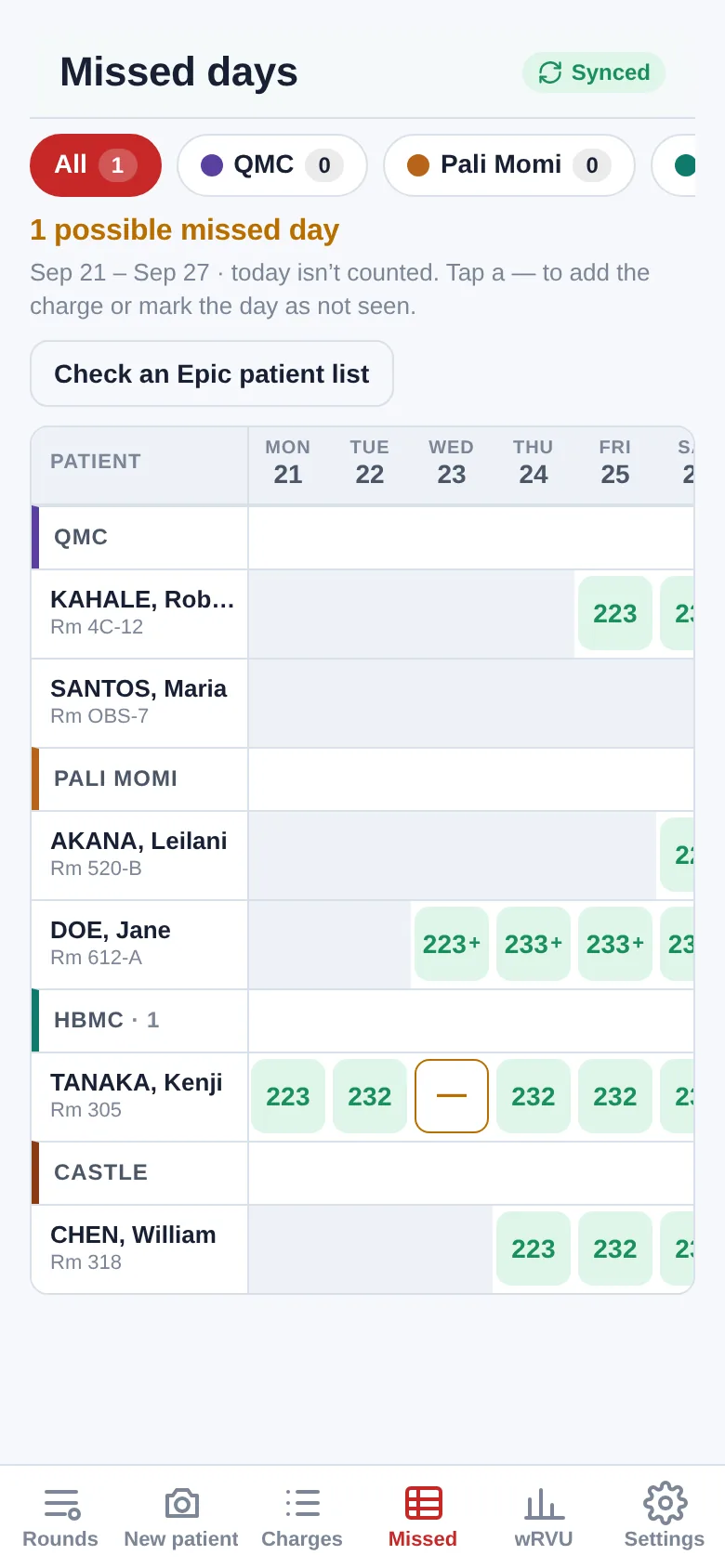
  • A week-by-week board of every day a patient was followed without a visit entered.
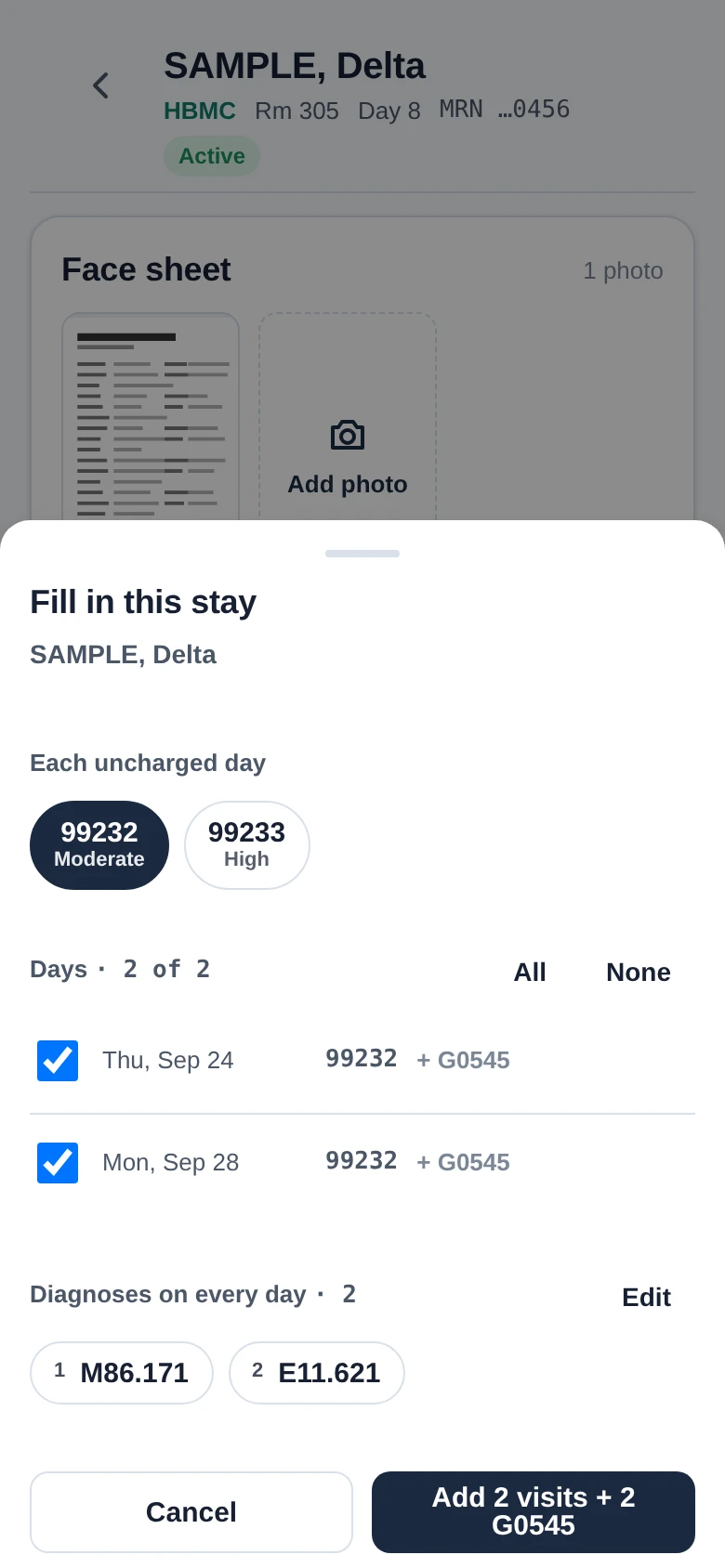
  • Fill in a whole stay at once, with days not seen left unticked.
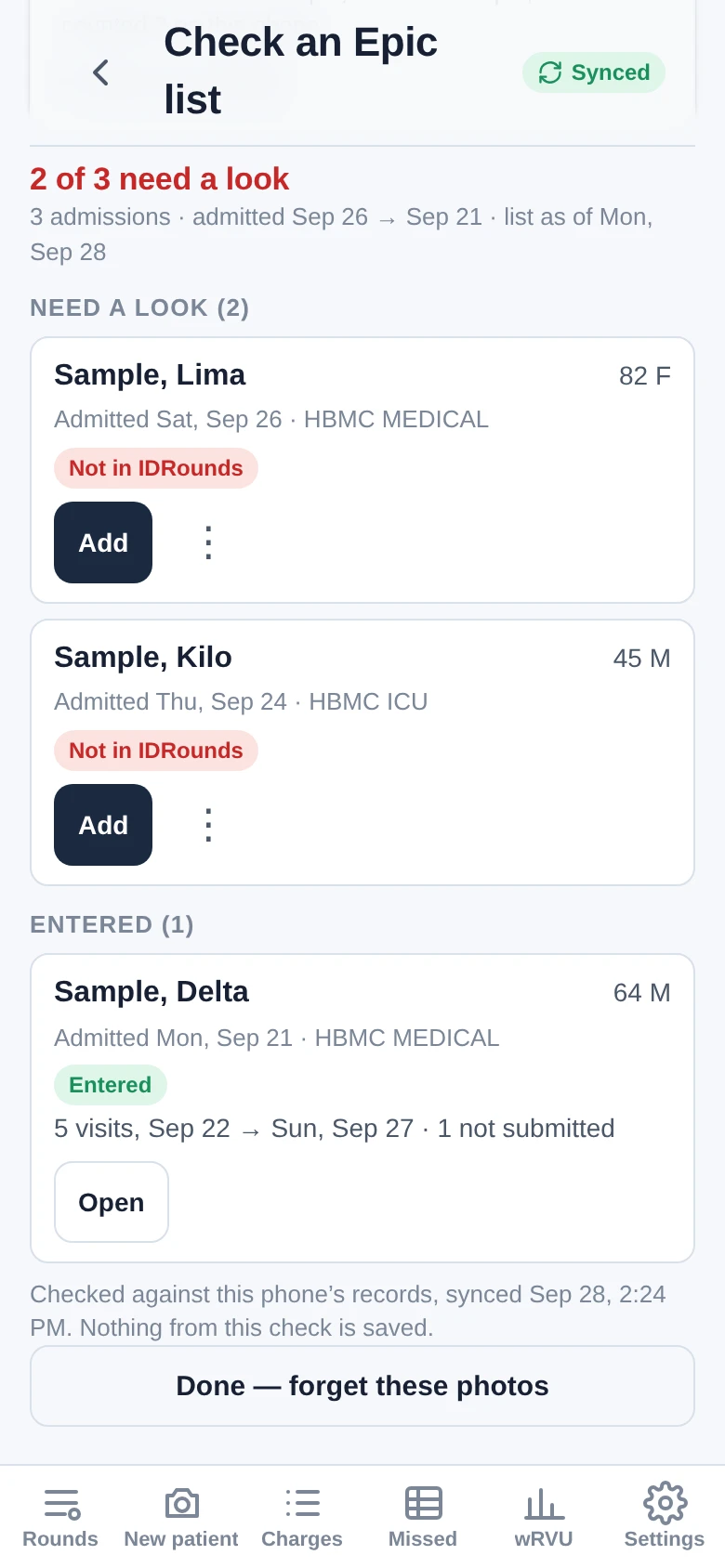
  • Photograph an Epic patient list to see which admissions never made it in.
  • For hospitals you visit on trips, days away never count as missed, and a trip calendar marks the days you were there so a missed visit is still caught.

Weekend coverage

  • The physician on call sees the group's active patients for the length of their call.
  • "Seen by" markers stop two visits on one patient on one day across the group.
  • A covering visit bills under the covering physician's own NPI.
  • Choose whether you cover the whole group or only certain doctors and hospitals.
  • A one-line hand-off for each of your active patients, filled in from your latest signed note and yours to edit; the covering physician sees it on their list.
  • A sign-out letter for each hospital, written in the physician's own style: name, room and MRN for each active patient, sorted into new consults, patients to see, and patients to see only if called. The physician reviews it, then copies, shares or emails it to the covering physician within the practice's own email domain.

Biller portal

  • Batches arrive numbered, with a readiness check for name, date of birth and face sheet.
  • Visits grouped into one claim per hospital stay, add-ons joined to their visit.
  • Face-sheet images, CSV export, mark billed, and a flag-and-comment loop to the physician's phone.
  • Each biller sees only the physicians they bill for.
  • The biller confirms receipt of each batch, and both sides see the same batch state: new, seen, received or complete.
  • Reports read on opening: the same patient twice on one day, lines waiting too long, how late charges arrive, the code mix and aging by payer.
  • The practice's billing details and the referring provider's NPI on the export.

Productivity and hospital computers

  • wRVUs by month, week or day from the CMS Physician Fee Schedule.
  • Expected collections shown as a range from the practice's own payment history.
  • A travel list for trips to a hospital on another island: the trip dates and how many patients with a chosen insurer were seen, on the Work card and emailed to the physician on the 1st of each month.
  • A desk page for shared hospital computers that opens on the note exactly as it will paste into Epic: edit, sign and copy, with nothing stored in the browser. At sign-out the desk clears the note from the clipboard where the browser allows it.

Built, ready to switch on

Available to switch on

These are installed with IDRounds and stay off until a practice turns each one on, after any agreement it needs is in place.

Notes from Epic

  • Paste a note you wrote in Epic, on the phone or at a hospital computer, and your next follow-up builds on it.
  • Other clinicians' notes can be brought in too. Their facts stay marked as theirs, never count toward your visit level, and are erased 30 days after the stay ends.
  • A note brought in at a hospital computer can be undone there for 15 minutes.

Chart summaries

  • Paste other clinicians' notes onto a patient's card and get an interval summary for infectious diseases.
  • The AI only picks sentences from the notes; the summary repeats them as written, with patient names and identifiers taken out, and each one opens the line it came from.
  • The pasted notes are erased within three days.

Nurse practitioners and shared visits

  • A nurse practitioner's own account, signing notes with their credential, with their lines held until the biller confirms their enrollment and the payer's rules.
  • A team link lets a physician and a nurse practitioner see each other's active hospital patients. The physician or an administrator can end it at any time.
  • A shared visit becomes one charge, billed by whoever did the substantive part once the other agrees.

Biller questions

  • The biller asks about one charge with one of six fixed reasons, and the line is held.
  • The physician answers on the phone by correcting or voiding the line, and only that answer, or the biller withdrawing the question, releases it.

Video follow-ups

  • For a follow-up on a hospital patient, such as one on another island, the physician taps Ping and keeps rounding.
  • The patient gets a one-time link by text, confirms their date of birth, and waits in a waiting room with a short page the physician wrote; the physician is texted when they are ready.
  • Video runs on Amazon Chime SDK in the practice's own AWS account, in US West (Oregon). Nothing is recorded.
  • Follow-ups only, with the patient's consent given once in person. The visit's times are logged; no charge is written until the physician saves one.

Follow-up text at sign-off

  • With an adult patient's verbal consent at the bedside, one text from "Dr. [last name]" with the office's number to book follow-up after discharge.
  • No patient name, diagnosis, hospital or practice name in the message.
  • Sent through Spruce, under the practice's own business associate agreement with Spruce.

Attention page

  • A bell in the header opens one list of the physician's own work still open: drafts, questions, missed days and the like.
  • It only points to that work and opens its usual screen; it is never a separate task list.

See it in action

Real screens from IDRounds, taken from the demo on one day, Monday, September 28, 2026. Every patient is a placeholder with the last name Sample and a first name from the phonetic alphabet (Alpha, Bravo, Charlie…), the physicians are demo accounts, and no real patient information appears anywhere on this site. Open any screen to see it full size.

New consult from one photo

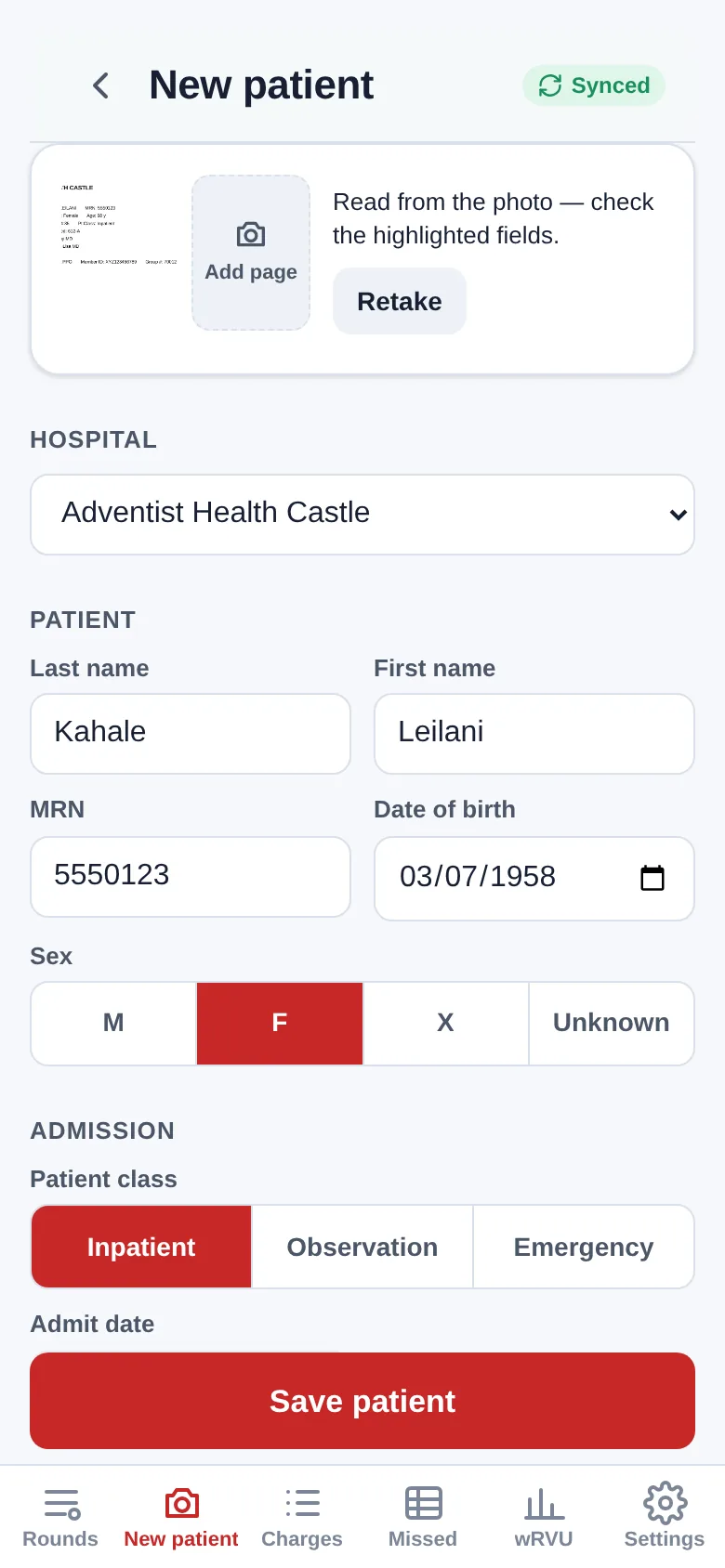
Photograph the Epic face sheet and the patient, admission and first charge are ready to confirm. Here, a new consult on SAMPLE, Juliet at Adventist Health Castle.

New patient screen after reading a photographed face sheet: hospital Adventist Health Castle, last name Sample, first name Juliet, MRN 5550123, date of birth 05/19/1961, sex F and patient class Inpatient filled in
Read from the photoThe phone reads the sheet itself: hospital, name, MRN, date of birth, sex and inpatient class, each there to check.
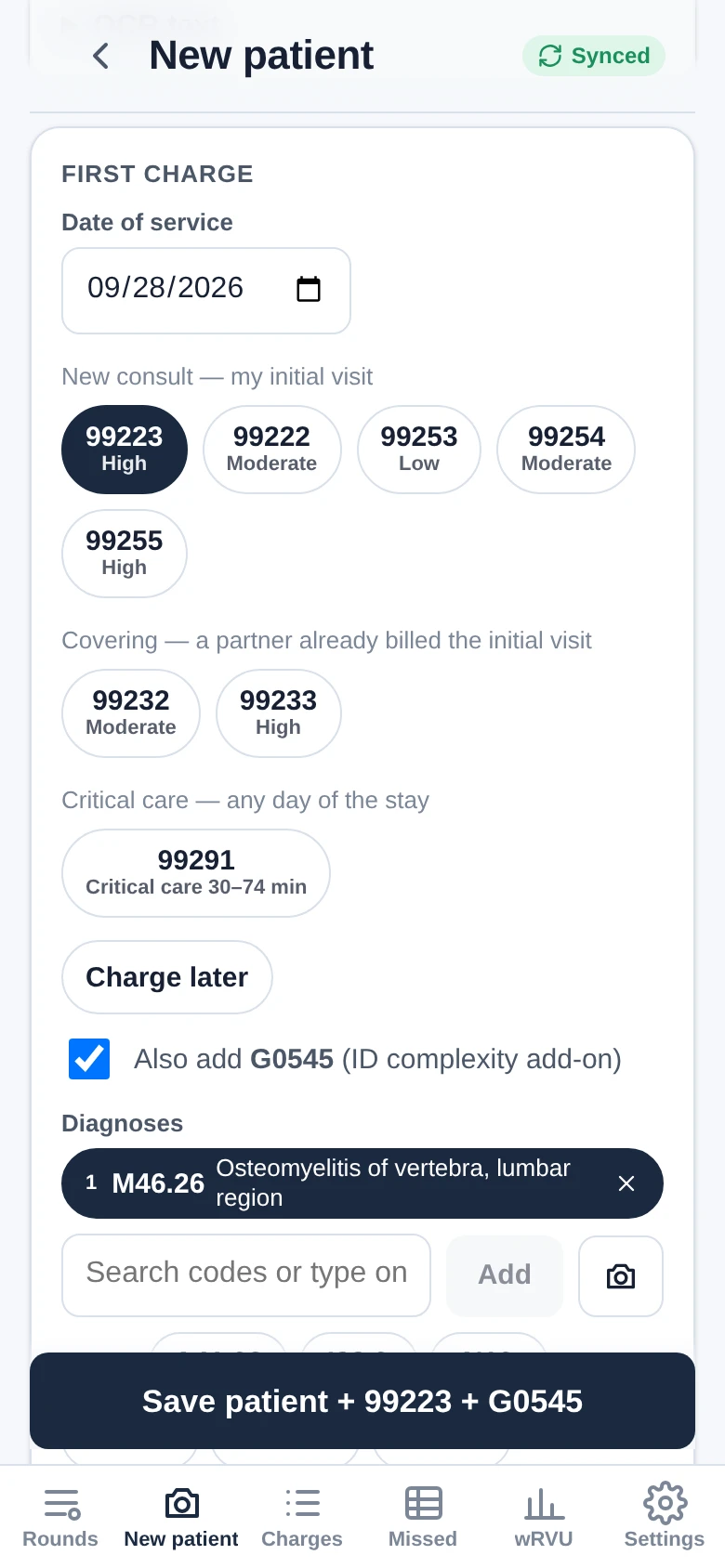
First charge card dated 09/28/2026: consult code 99223 High selected, covering and critical care codes offered, Also add G0545 ticked, diagnosis M46.26 Osteomyelitis of vertebra, lumbar region, and the button Save patient + 99223 + G0545
First charge on the same screenThe consult as 99223, the G0545 add-on ticked by default, and M46.26 as the diagnosis. One button saves the patient and both charges.
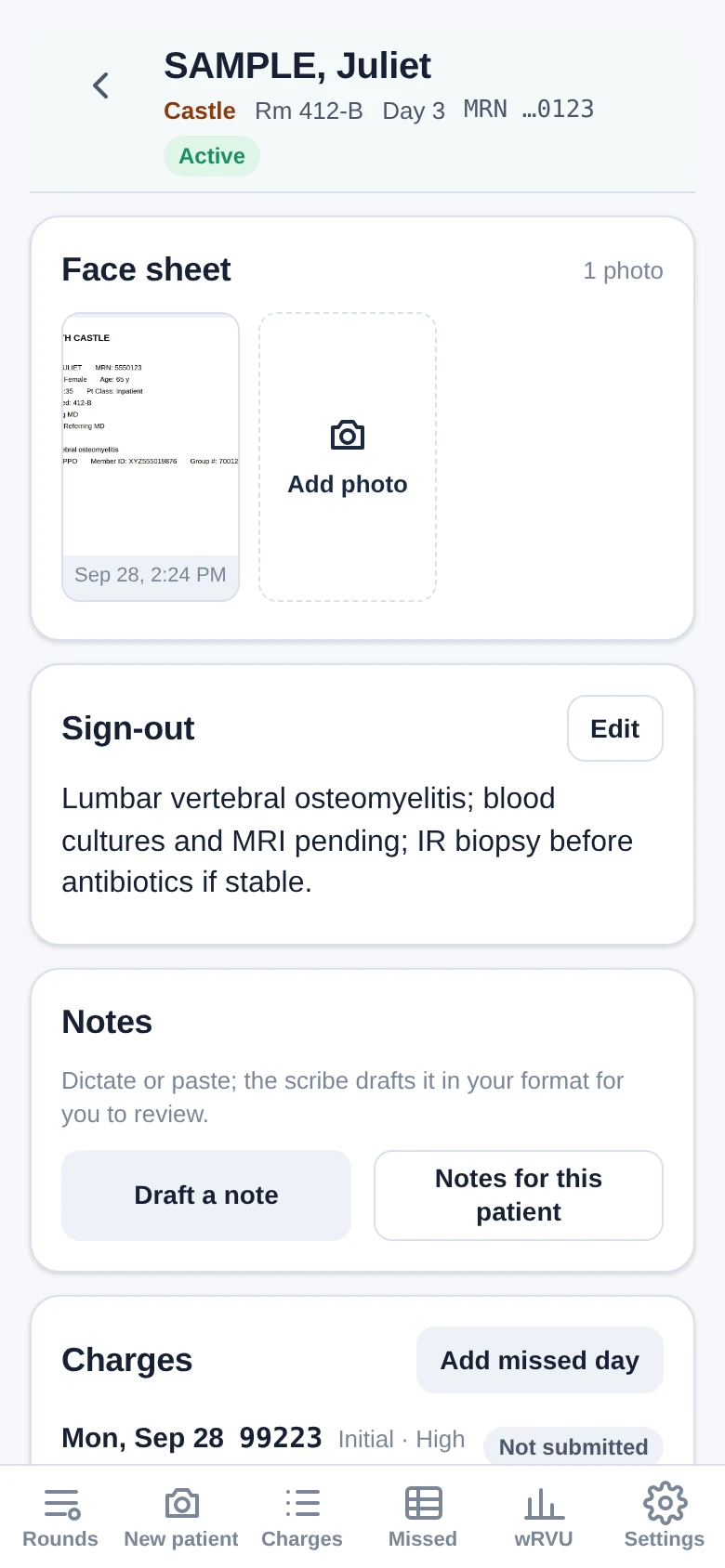
Patient page for SAMPLE, Juliet at Castle, Rm 412-B: the face sheet photo, the sign-out line, the Notes card with Draft a note, and the Charges card starting with Mon, Sep 28, 99223
Everything for the stayThe stay's own page: the face sheet photo, a one-line sign-out for whoever covers, notes, and today's 99223.

Rounding and submitting

The census at the top of this page is the day's to-do list, 5 of 7 patients seen so far. One tap on a code charges a visit, and the biller gets a checked batch.

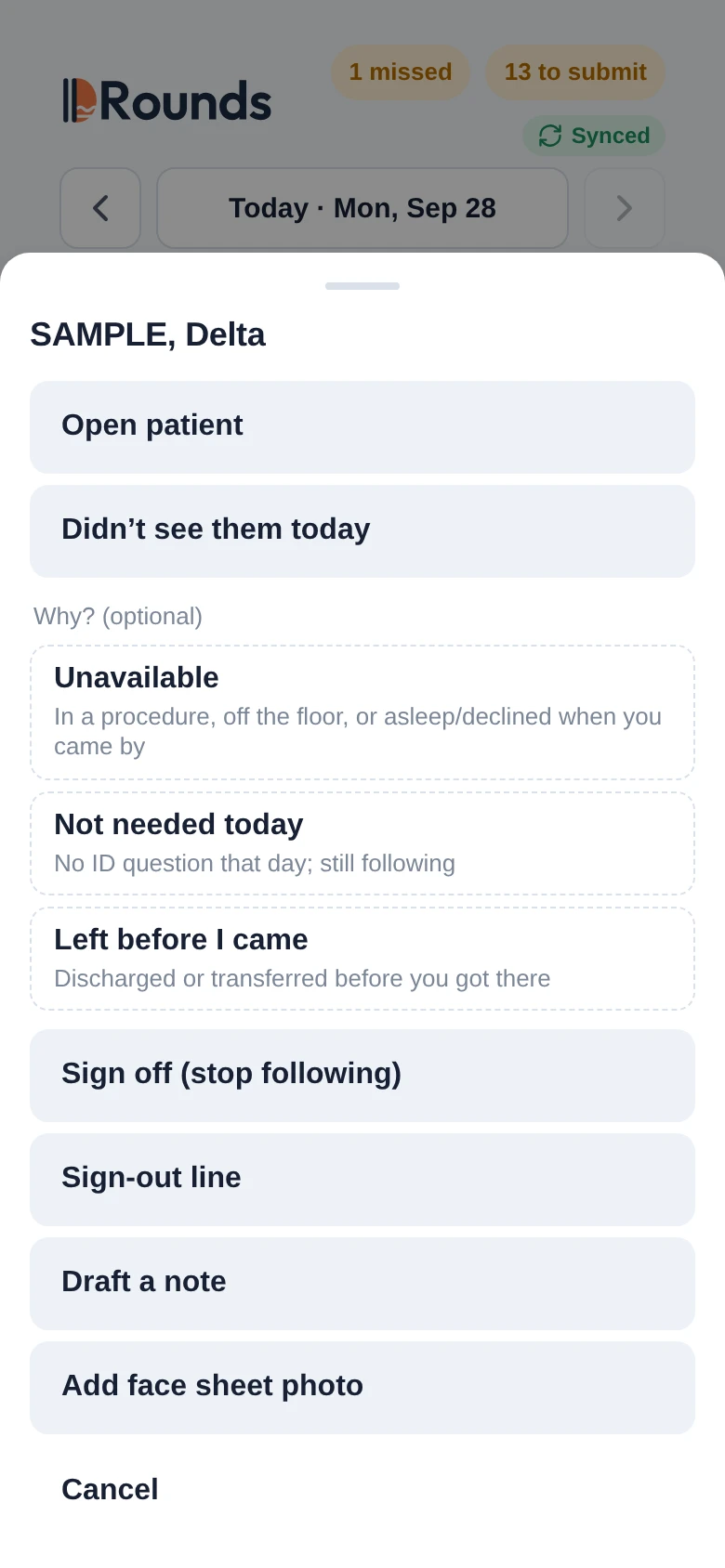
Menu for SAMPLE, Delta over the census: Open patient; Didn't see them today, with the optional reasons Unavailable, Not needed today and Left before I came; Sign off (stop following); Sign-out line; Draft a note; Add face sheet photo
Everything a patient needsSAMPLE, Delta has no visit yet today. Mark them not seen, with an optional reason, sign off, edit the sign-out line, draft a note or add a face sheet photo.
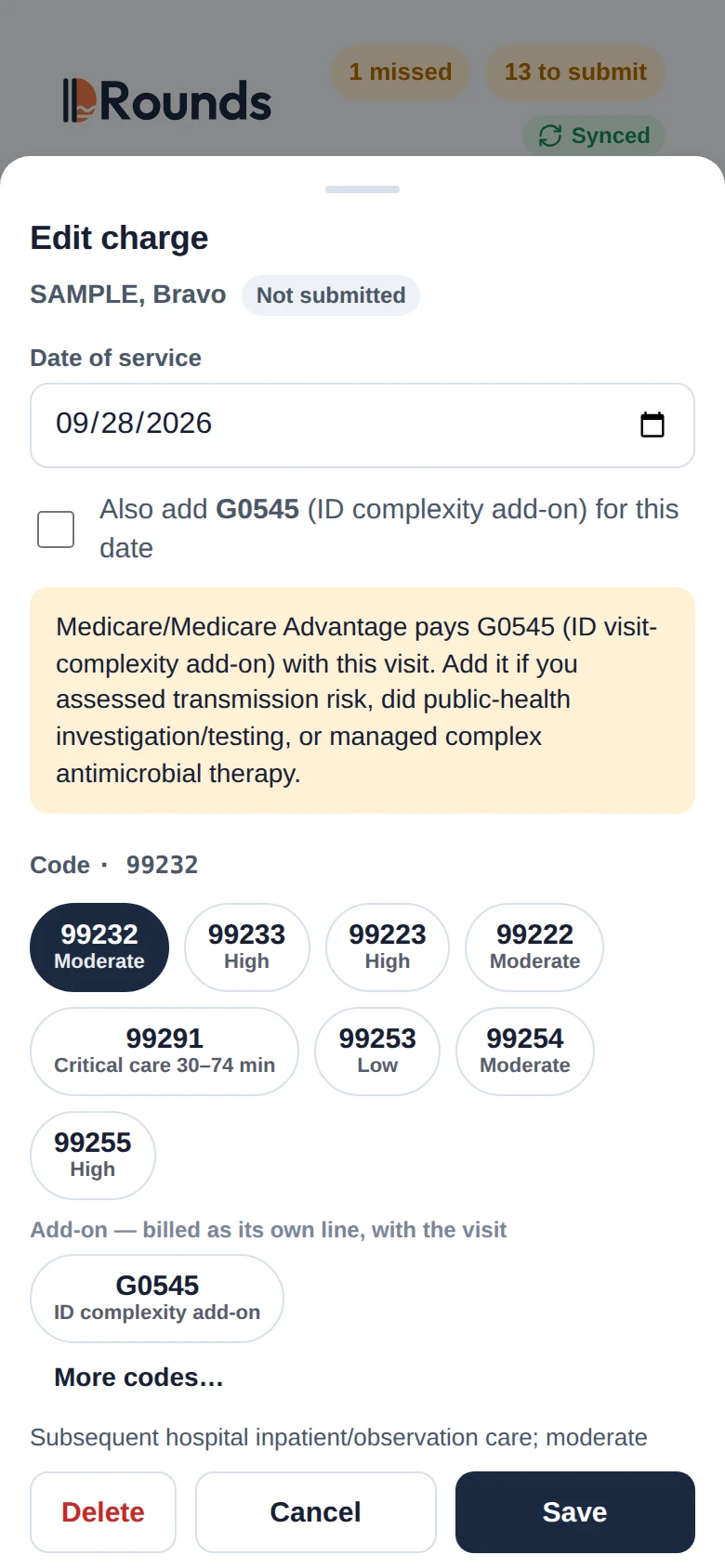
Charge editor for SAMPLE, Bravo, not submitted, date of service 09/28/2026: an unticked Also add G0545 box, a note that Medicare pays G0545 with this visit and when to add it, and code chips with 99232 Moderate selected
Payer rules as you codeEditing SAMPLE, Bravo's 99232 for today. The payer is Medicare, so a note says when G0545 is paid with this visit and what it takes.
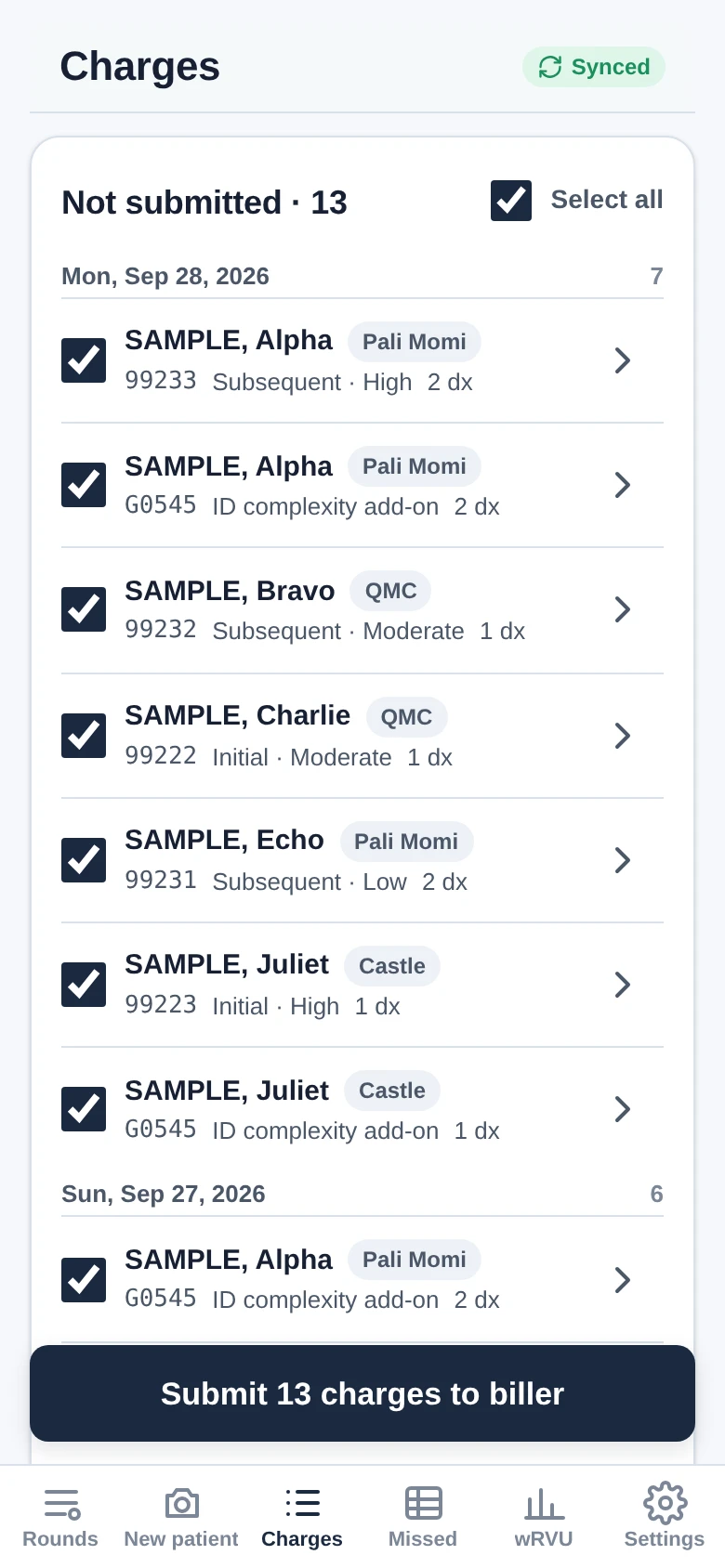
Charges tab: Not submitted · 13 with Select all ticked; Mon, Sep 28, 2026 lists 7 (SAMPLE, Alpha 99233 and G0545; SAMPLE, Bravo 99232; SAMPLE, Charlie 99222; SAMPLE, Echo 99231; SAMPLE, Juliet 99223 and G0545), Sun, Sep 27, 2026 lists 6, and the button Submit 13 charges to biller
Send the day's batchAll 13 charges not yet sent, 7 from today and 6 from Sunday, go to the biller in one batch, checked first for a name, date of birth and face sheet.

AI scribe

Dictate or type. The note drafts in our ID format, and the software, not the AI, picks the code.

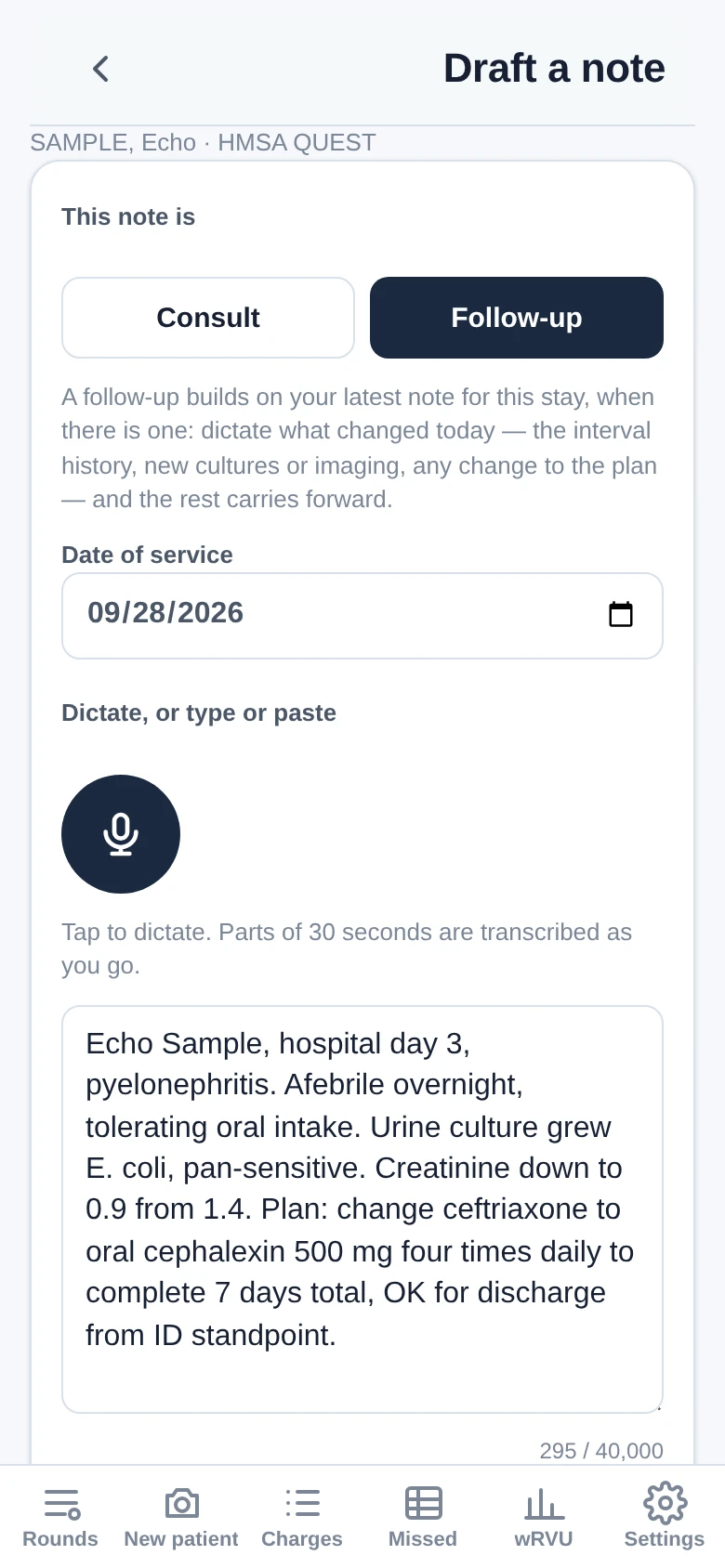
Draft a note for SAMPLE, Echo: Follow-up selected, date of service 09/28/2026, a microphone button, and the day's findings and plan typed in the box
Dictate the dayA follow-up for SAMPLE, Echo. Dictate, type or paste what changed today; a follow-up carries the rest forward from your earlier notes on the stay, when there are any.
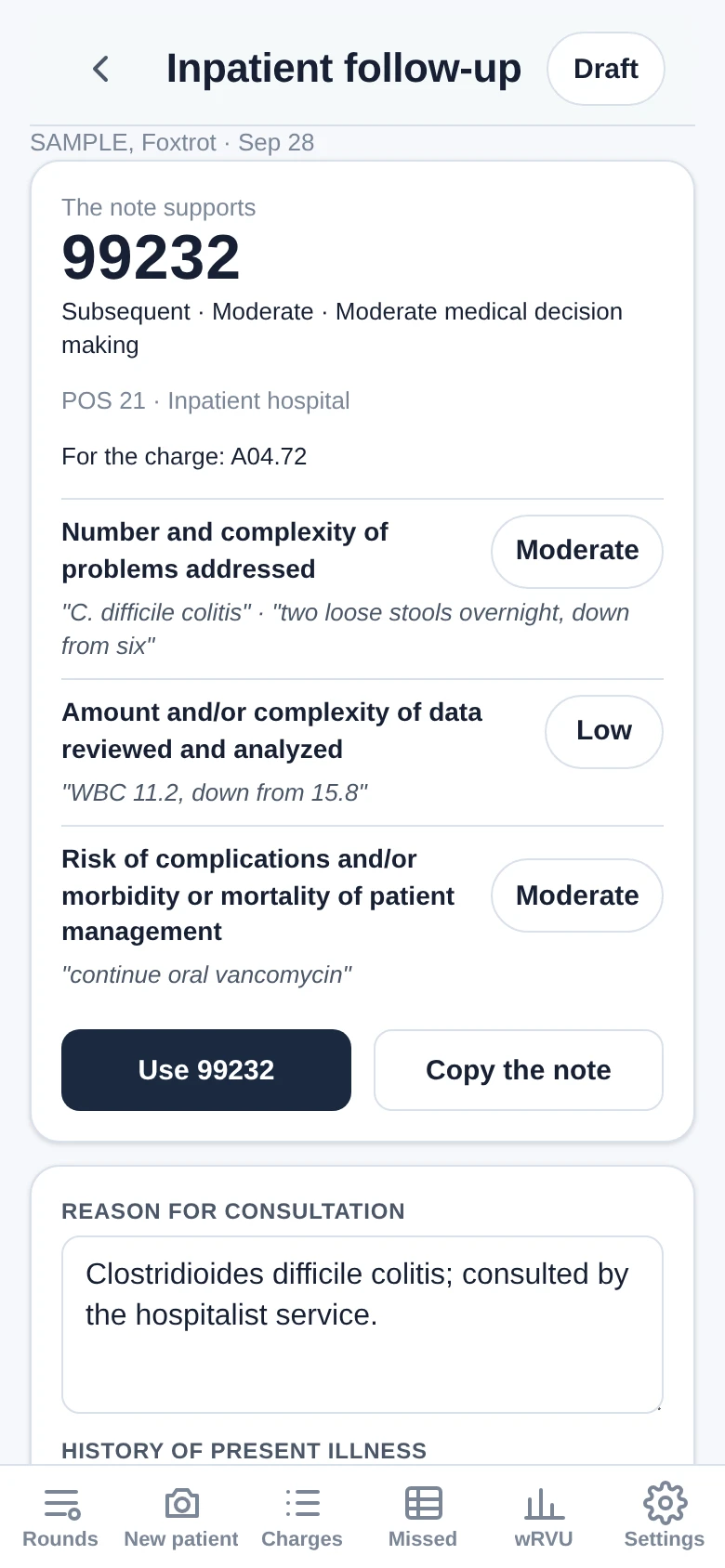
Review of SAMPLE, Foxtrot's drafted inpatient follow-up for Sep 28: the note supports 99232, POS 21, A04.72 for the charge; problems Moderate, data Low and risk Moderate, each with its quotation; buttons Use 99232 and Copy the note
The code, with its evidenceSAMPLE, Foxtrot's drafted follow-up supports 99232. Each grade shows the words from the dictation that support it, and Use 99232 starts today's charge with 99232 and A04.72 filled in, for you to save.

No missed charges

Days a patient was followed without a visit entered are found for you.

Missed days board for Sep 22 to Sep 28 showing 1 possible missed day: patients grouped by hospital with a code in each charged day, and an orange dash on Thu 24 for SAMPLE, Delta at HBMC
Missed daysOne possible missed day from Sep 22 to 28: SAMPLE, Delta at HBMC, seen Wednesday and Friday but not Thursday the 24th.
Fill in this stay sheet for SAMPLE, Delta: 99232 for each uncharged day, Thu, Sep 24 and Mon, Sep 28 both ticked with 99232 + G0545, diagnoses M86.171 and E11.621 on every day, and the button Add 2 visits + 2 G0545
Fill in a whole stayThursday's gap and today, both ticked: two 99232 visits for SAMPLE, Delta, each with G0545 and the same two diagnoses, added in one step.
Epic list check: 2 of 3 need a look. Sample, Lima and Sample, Kilo, both at HBMC, marked Not in IDRounds with an Add button; Sample, Delta marked Entered, 5 visits from Sep 22 to Sep 27
Check against EpicA photographed HBMC list: Sample, Lima and Sample, Kilo are not in IDRounds yet; Sample, Delta is, with five visits. Nothing from the check is saved.

Weekend coverage

The physician on call sees the group's patients and bills covered visits under their own name. Both screens are from the covering doctor's phone.

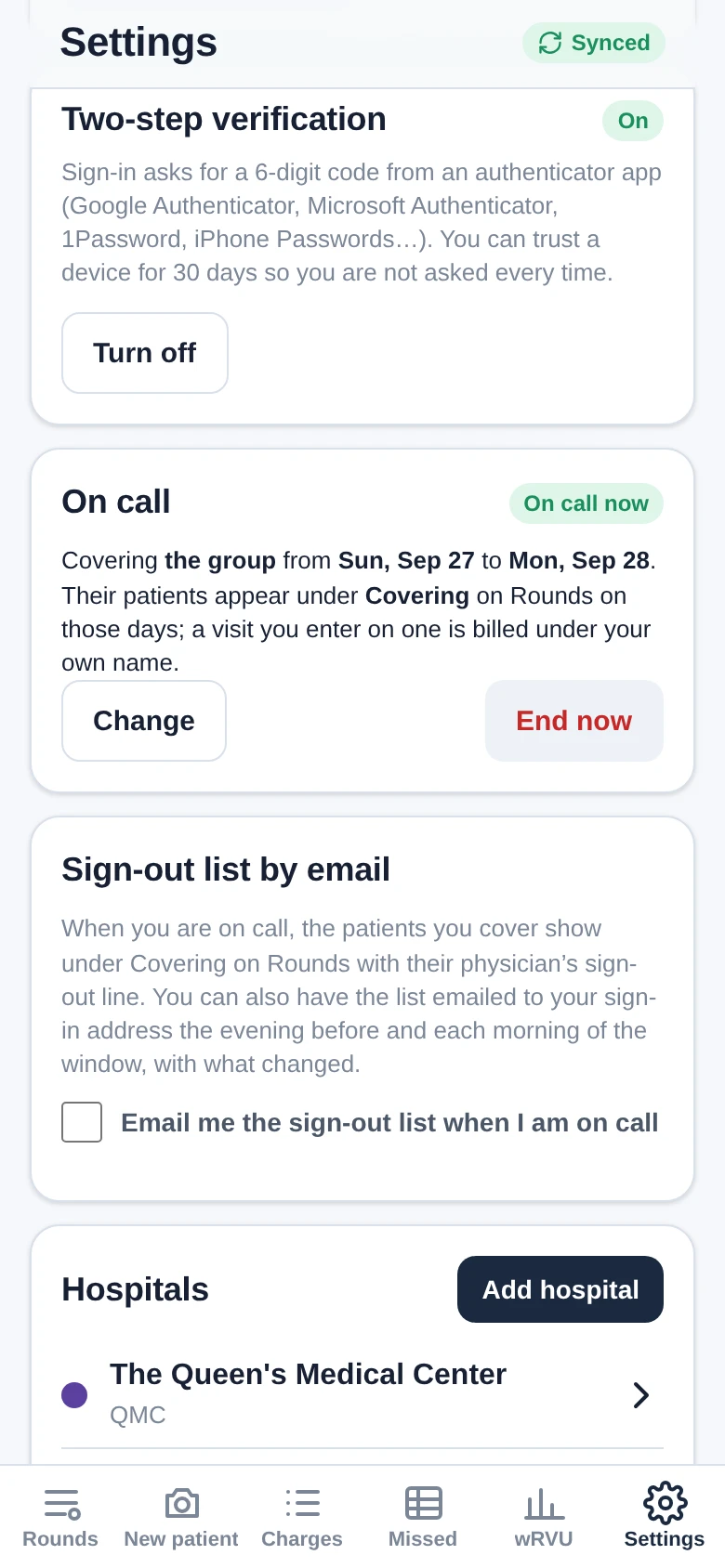
Settings on the covering doctor's phone: Two-step verification On; On call now, covering the group from Sun, Sep 27 to Mon, Sep 28, with Change and End now; Sign-out list by email with its box unticked
Go on callOn call for the group from Sunday, Sep 27 to Monday, Sep 28; Change can narrow it to certain doctors. An email of the sign-out list is one tick away.
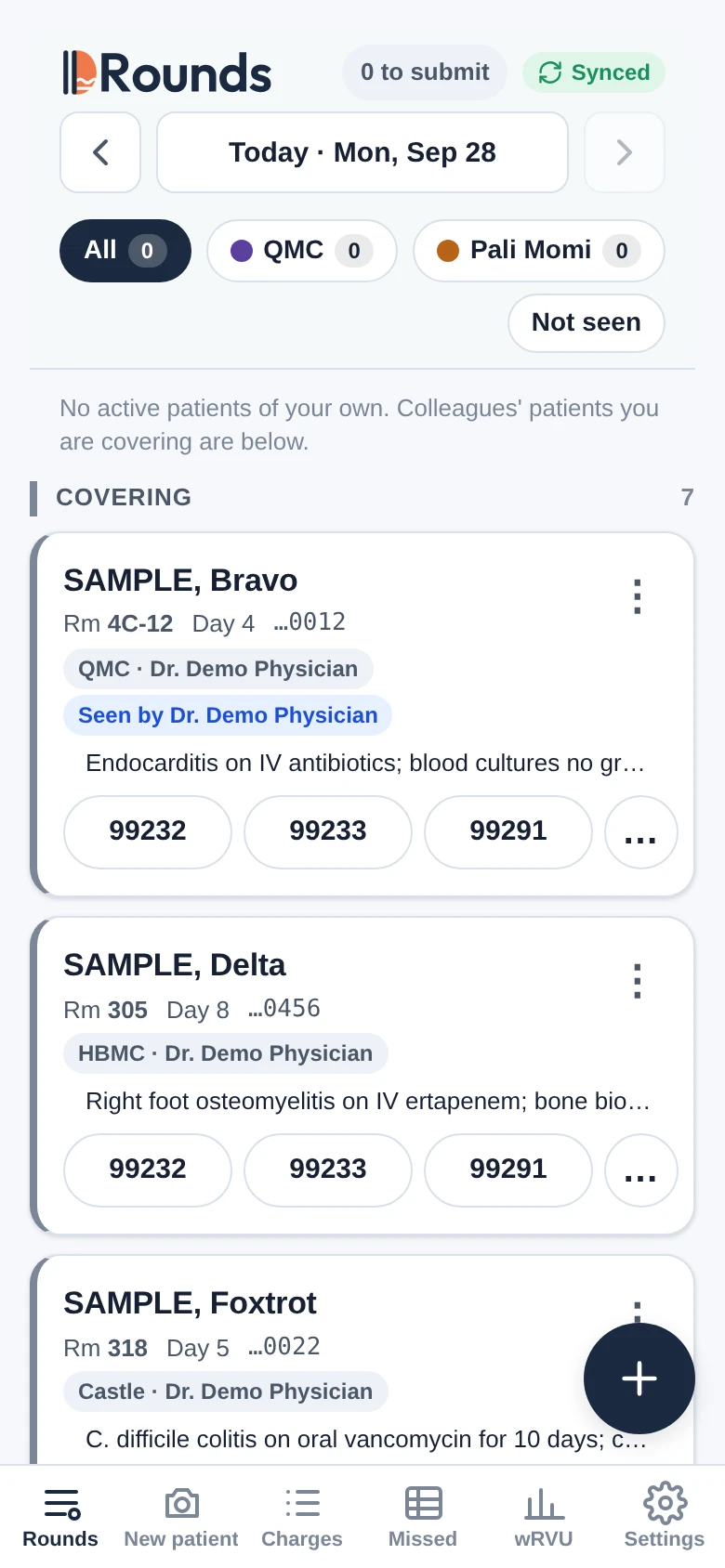
Rounds on the covering doctor's phone: no patients of their own, and Covering 7 listing SAMPLE, Bravo at QMC, seen by Dr. Demo Physician, SAMPLE, Delta at HBMC and SAMPLE, Foxtrot at Castle, each with its sign-out line and visit codes
Covered patients on your listDr. Demo Physician's 7 patients under Covering, each with its hospital, its physician and the sign-out line. SAMPLE, Bravo is marked as already seen today.

On the desktop

The biller works from a portal, and physicians can finish notes on a hospital computer without storing anything in its browser. On a phone, open a screen to read it.

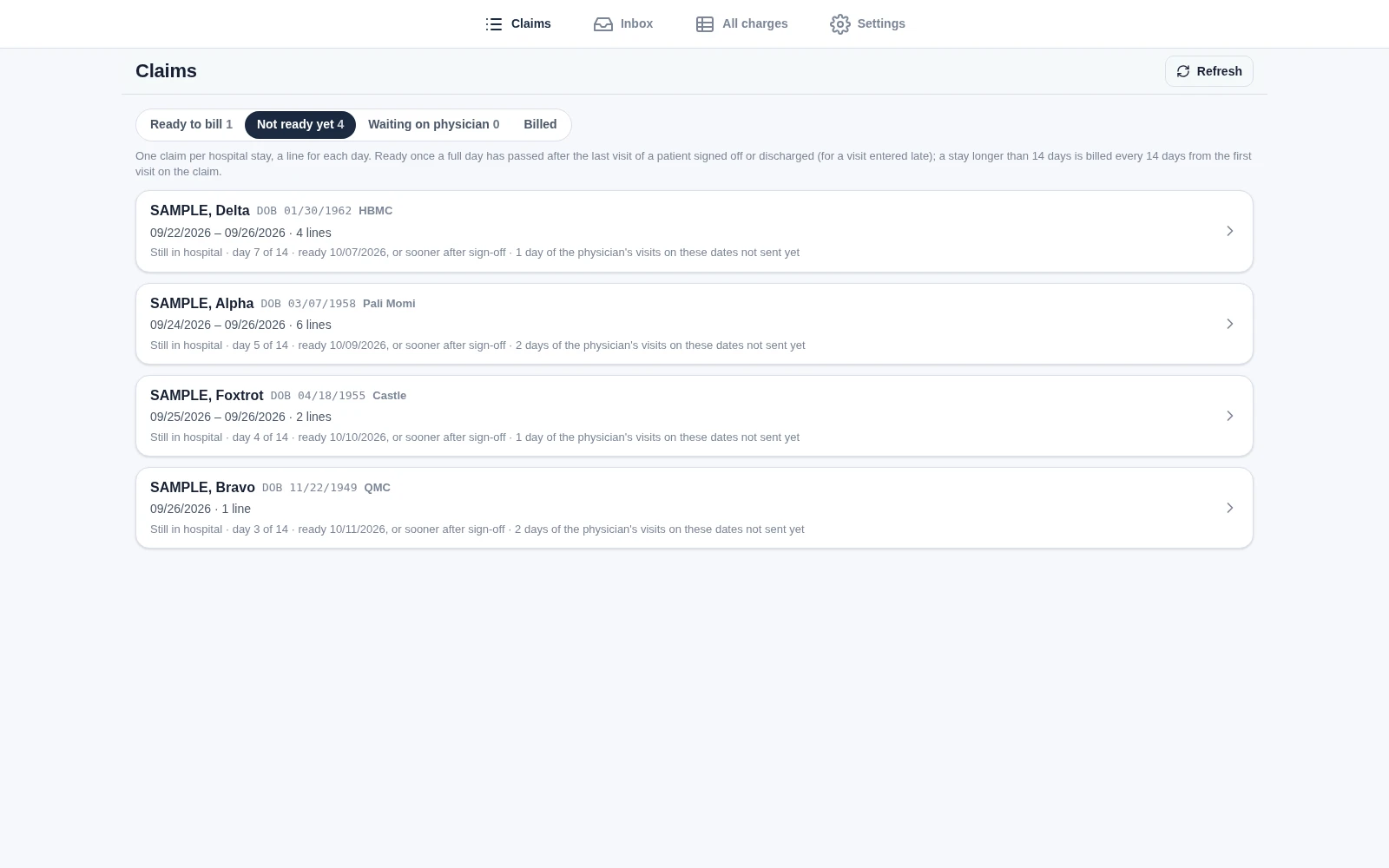
Biller Claims page on the Not ready yet tab: Ready to bill 1, Not ready yet 4, Waiting on physician 0 and Billed; one claim for each stay still in hospital: SAMPLE, Delta at HBMC, 09/22/2026 to 09/26/2026, 4 lines, day 7 of 14; SAMPLE, Alpha at Pali Momi, 6 lines; SAMPLE, Foxtrot at Castle, 2 lines; and SAMPLE, Bravo at QMC, 1 line; each ready at its 14 days, or sooner after sign-off
Claims, one per hospital stayEach stay still in hospital is one claim that grows with every visit sent, ready after 14 days or sooner once the patient is signed off. SAMPLE, Golf's signed-off stay is the one ready to bill.
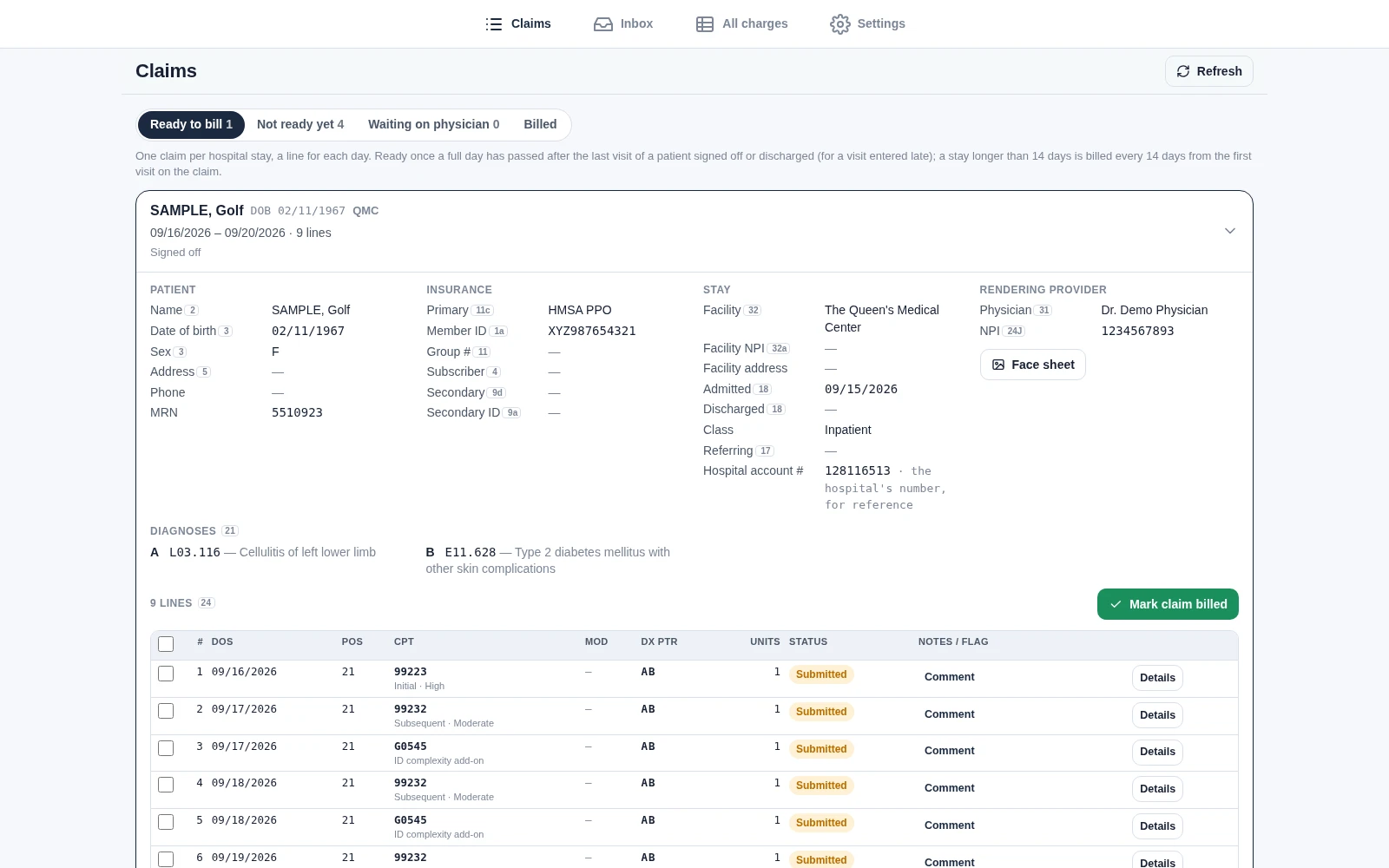
SAMPLE, Golf's claim opened on Ready to bill: patient, insurance (HMSA PPO), the stay at The Queen's Medical Center and the rendering provider, with the CMS-1500 box number beside each field the form has; diagnoses A L03.116 and B E11.628; the first of its nine lines from 09/16/2026 with 99223, 99232 and G0545; and Mark claim billed
Everything on the claimSAMPLE, Golf's claim: the CMS-1500 box number beside each field the form has, diagnoses lettered A and B, and the claim's lines with their pointers, with the face sheet one click away.
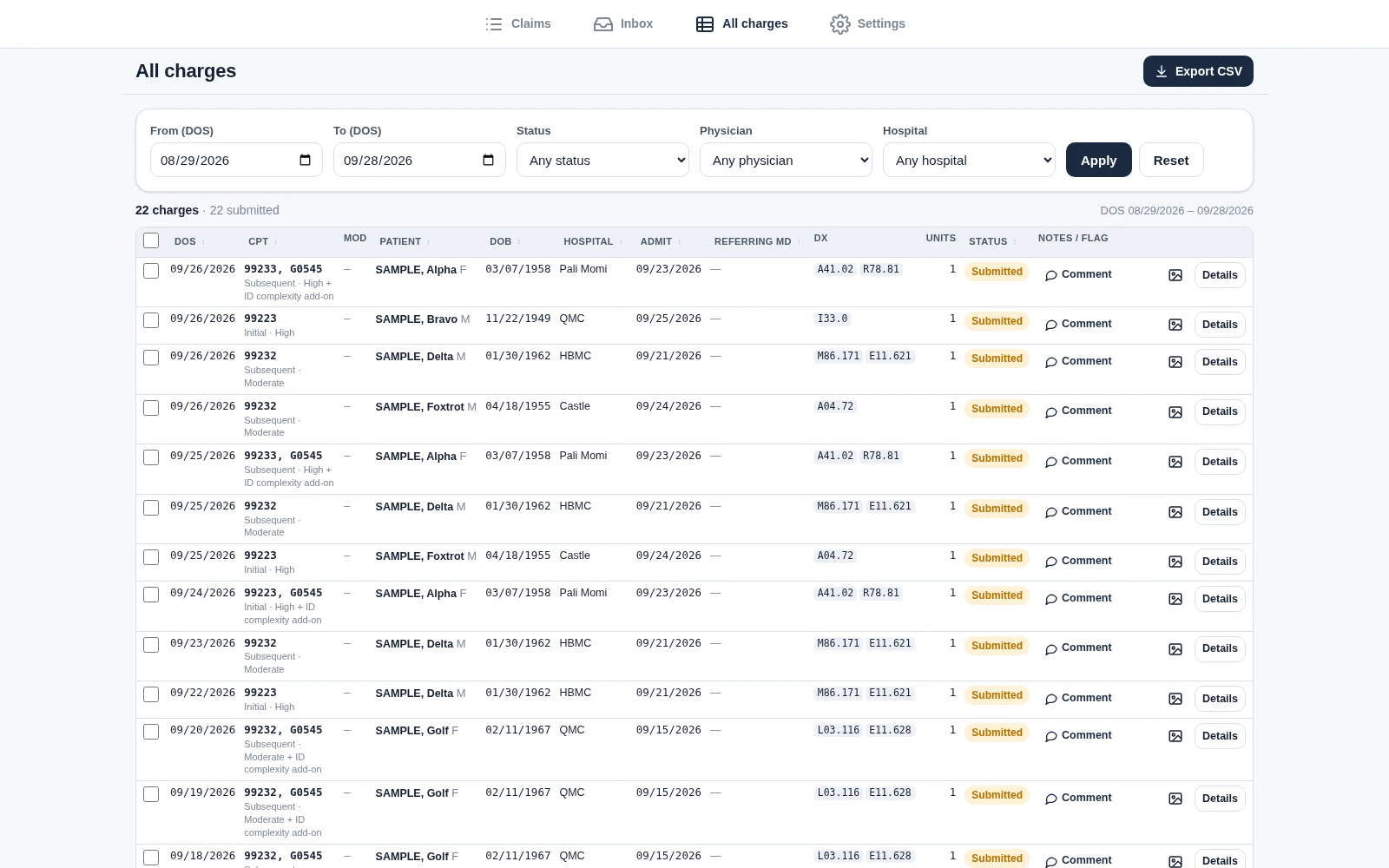
All charges grid for 08/29/2026 to 09/28/2026: 22 charges, all submitted, with filters for dates, status, physician and hospital, Export CSV, and rows such as 99233, G0545 for SAMPLE, Alpha at Pali Momi
All charges22 charges between 08/29 and 09/28/2026, with filters for status, physician and hospital. A visit and its G0545 share a row, and Export CSV writes the file for the billing system.
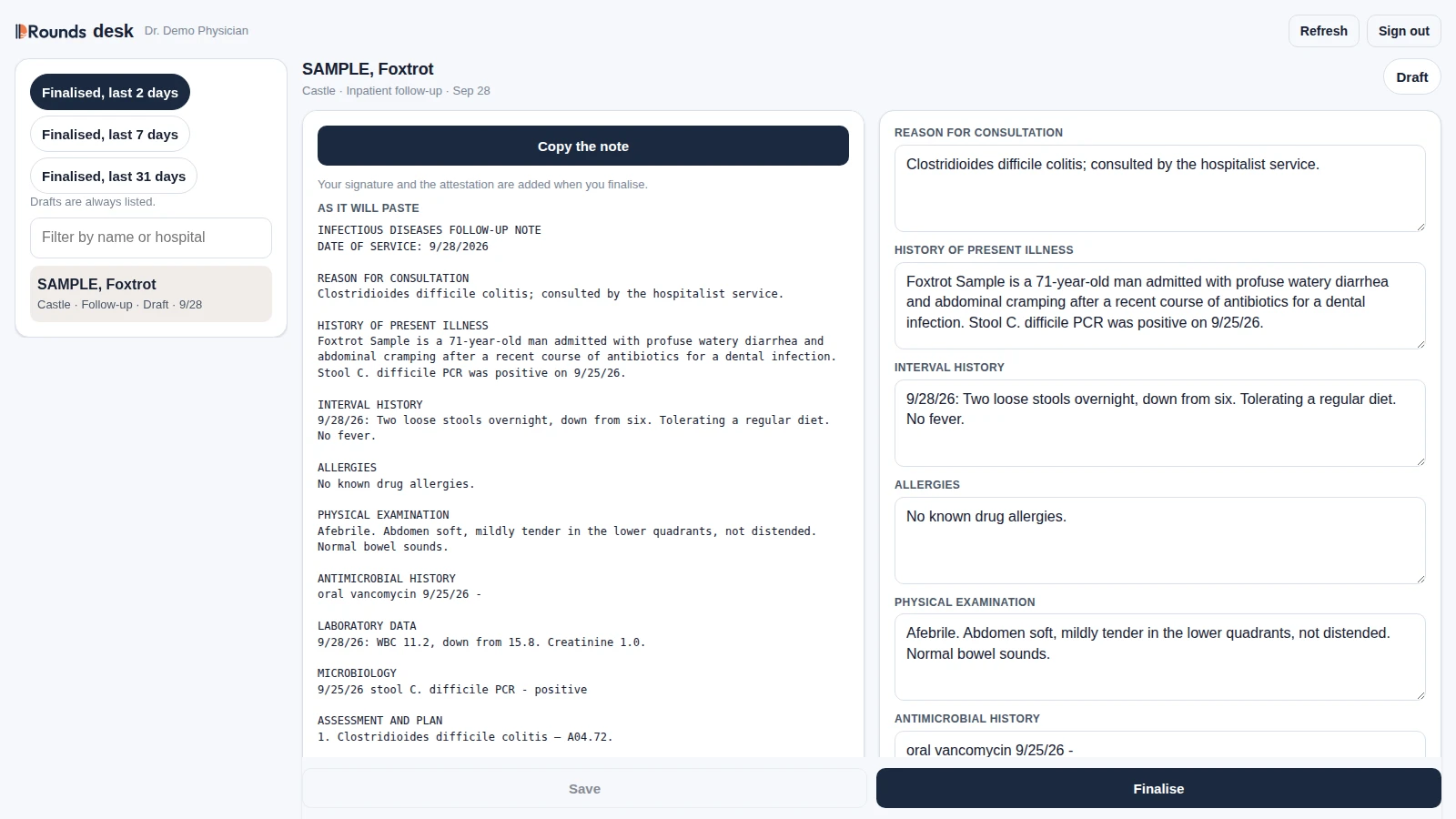
Desk page at a hospital computer for Dr. Demo Physician: the note list with SAMPLE, Foxtrot's draft follow-up, the note as it will paste into Epic under Copy the note, and editable sections on the right with Save and Finalise
The desk at a hospital computerSAMPLE, Foxtrot's draft opens exactly as it will paste into Epic, Copy the note on top and the sections to edit beside it. Nothing is stored in the browser, and signing out clears the copied note from the clipboard where the browser allows it.

Home infusion

Available to switch on

A module of IDRounds for a team that mixes and delivers home infusions: order entry, compounding, labels, delivery, nurse visits and billing, in place of the spreadsheet and the paper check. It is built and installed with IDRounds, and a practice switches it on. Staff sign in from their own phones, tablets or computers; every screen with patient information needs two-step sign-in, the page signs out after a short idle time, and nothing is kept in the browser.

A Patient list like the spreadsheet

  • One day at a time, with the columns of the team's own spreadsheet, typed into like Excel.
  • Each day's list is saved as a sealed snapshot, so a past day shows as it was.
  • Tabs for each service area, patients still in the hospital, and patients admitted while on therapy.
  • Day 3 of 14 on each line, therapies starting or ending soon in color, a "discontinue?" prompt, dated notes, and a warning before an authorization ends.

New patients and orders

  • Start a patient from a face-sheet photo or PDF, with optional AI reading.
  • The doctor's message is kept beside the order as text or as pictures.
  • A drug table imported from a RED BOOK file, with HCPCS codes from the CMS crosswalk.
  • Delivery and mixing schedules built from each order, for nurse delivery or UPS.

A second person checks every order

  • Each order version is checked at compounding by someone other than the person who entered it.
  • A compounding record for each delivery, drawn like the practice's paper form: mixing, packing, then a nurse's mix check by someone who did neither.
  • Scan a drug box to fill in its NDC, lot and expiry.

Labels for every dose

  • A barcoded label for each dose, printed on Zebra label printers, including 2-inch printers.
  • Each label is scanned at packing and again at the nurse's mix check.

Delivery tickets signed on screen

  • The patient, a family member or a caregiver signs the delivery ticket on the nurse's phone.
  • When no one is home, the nurse marks it so, and the delivery gets a new date.

Nurse visits and billing

  • A visiting nurse records each home visit with one tap, and its hours.
  • A billing ledger lists the drugs delivered, the per-diem days and the nurse visits, ready for the biller, with no prices.

Records and recall

  • Every compounding record and delivery ticket is kept and can be found again by patient, date, drug, person, NDC or lot.
  • A lot or NDC lookup lists every delivery that carried it, for a recall.
  • Every search and every record opened is logged.

Doctor texts

  • Available to switch on: a text to the ordering doctor asking them to confirm an order, through Spruce. A "no" holds the order's next step until it is sorted out.

Answering Service

Being built

Answering Service is an AI voice assistant for a clinic's phone. It is meant to answer the calls staff can't pick up (the clinic phone forwards calls that are busy, unanswered or unreachable), turn each call it answers into a ticket for the office, and try to hand urgent calls to a person. It is not taking patient calls yet. Before the first real call, its setup guide requires business associate agreements covering Twilio, Retell AI, the language model Retell uses and the Google Cloud project, plus a live test call of every call type.

Sorts calls into tickets

  • Calls are saved as tickets of nine types: reschedule, cancel, running late, medication refill, referring office, records request, hospital case manager, clinical/symptoms, or a general message.
  • The assistant asks for the details each type needs, such as the medication, pharmacy and days left for a refill.

Sets urgency by rule

  • Urgency comes from rules in code as well as from the assistant's judgment.
  • A refill with 3 or fewer days left, or none, is urgent. A running-late call is same-day.
  • A hospital case manager's call about a discharge today or tomorrow, or one involving home infusion (OPAT), is urgent.
  • The assistant can raise a ticket's urgency but can never lower it below what the rules set.

Hands calls to a person

  • When a caller reports new or worse symptoms, a fever or an IV-line problem, or asks for a person, the assistant is instructed to transfer the call to staff.
  • Staff phones ring one at a time, in an order each location sets, up to five numbers. On a screened step, the person who answers hears a short summary, and the caller is connected only if that person presses 1.
  • If no one accepts an urgent call, the ticket is marked urgent and the office gets a text. The caller is told when to expect a call back, and to call 911 or go to the nearest emergency room in an emergency.
  • A caller who only wanted a person on a routine matter goes back to the assistant to leave a message.

Opens the ticket itself when it has to

  • When the voice service reports a call that ended before the assistant saved a ticket, the system opens one with the caller ID and any transcript and recording the call left.
  • If the voice assistant can't be reached when a call arrives, the caller hears a message with the 911 line and can leave a voicemail of up to 3 minutes.
  • The office gets the ticket and a text before the recording exists, and the recording is attached to the same ticket afterwards.
  • If the whole service is down, a message set up at Twilio still takes a voicemail, without a ticket or a text.

Checks the caller's own words after the call

  • After each call in which the caller spoke, the system checks the caller's words for warning signs such as fever, chills, a leaking or dislodged line, redness, bleeding or vomiting. It ignores mentions like "no fever" or "if it leaks".
  • If it finds a sign the assistant didn't act on, the ticket turns urgent with the caller's words quoted on it. The office gets a text unless the caller already reached a person.
  • This check skips calls from other offices, case managers and pharmacies, and it skips referral and records requests.

Texts the office

  • The office's alert phone (usually the medical assistant's cell) gets a text for urgent calls, patients running late, urgent transfers nobody accepted, symptoms the assistant didn't act on, and calls sent to voicemail.
  • A text the texting service refuses is retried. A failed urgent or voicemail text goes to the next backup phone.
  • An urgent ticket nobody has picked up gets reminder texts, down the location's backup phones one at a time, or one reminder to the alert phone when the location has no backups. The reminders stop when someone starts or closes the ticket or accepts its transfer, or when the list runs out, and a location can switch them off.
  • Each location chooses whether its texts go out at once while it is closed, or wait for one summary text at opening. When texts wait, reminders wait too.

Gives staff a call queue

  • Staff work from a mobile web queue with Open and Done tabs, with urgent calls listed first.
  • Each ticket page has a call-back link, the call details, the recording and transcript when the call has them, the transfer attempts and a history. It also has Start and Mark done buttons.

Runs several locations

  • One installation serves several locations of one practice, and a call follows the number that was dialed.
  • An admin edits each location on a Settings page: its hours, its transfer order (including whether transfers ring everyone, only the first person or no one while it is closed), its alert and backup phones, and the wording callers hear.
  • For other practices, the plan is that each will get its own server, database, storage and phone numbers.

Security and privacy

IDRounds holds protected health information, so the safeguards are part of the software, not a policy on paper. This section describes IDRounds only, not Answering Service.

  • Encrypted at rest and in transit AES-256 encryption of the server's database, separately encrypted face-sheet images, HTTPS only.
  • Two-step sign-in and a phone PIN Authenticator-app codes on any account that turns them on, and always at hospital computers and on the home infusion screens; account lockout; and an app PIN on every physician's phone.
  • Append-only access log Every access to patient information on the server is recorded and can be reviewed by an administrator.
  • Minimum necessary access Physicians see their own patients, and the patients they cover while on call; billers see only the admissions submitted by the physicians they bill for. A physician who is an administrator can also open the biller portal, which shows every physician's submitted admissions.
  • No patient data where it can leak Never in web addresses, server logs or browser caches. The phone keeps the patients on its list for rounds without signal, behind the app PIN and the phone's own passcode. A hospital computer stores nothing in its browser, and the desk clears the note from the clipboard at sign-out where the browser allows it; it cannot reach Windows clipboard history or a clipboard manager.
  • A lost phone can be signed out and erased Each person sees the phones and browsers signed in to their account. They, or an administrator, can sign one out remotely, or have IDRounds erase that account's data on it the next time it reaches the server. Work not yet saved on the server is lost, and a phone that never reconnects cannot be erased.
  • Passkeys, available to switch on A passkey can take the place of the authenticator code at sign-in, with the phone checking the person every time. The password and code stay for setting up and recovery.
  • AI switched on one feature at a time Each AI feature that sends patient information stays off until its vendor's business associate agreement is in place, and every transmission is logged. The problem-list reader is meant for photos framed without identifiers, so it is switched on without that agreement; the AI is asked to report any identifier it sees in a photo it was sent, and that report is shown and recorded.

How we build

  • A physician approves every note and charge Nothing reaches a chart or a claim until the treating physician has reviewed it.
  • Rules come from the source The AMA decision-making table, the CMS fee schedule and the official ICD-10-CM code set live in the software as data, updated when their sources change: the fee schedule with each CMS release, the code set every October.
  • Tested on real rounds first We use IDRounds on our own rounds every day, and a feature goes to other practices only after we've used it ourselves.

What's next for IDRounds

Bringing IDRounds to your practice

IDRounds was built for our own infectious diseases group and runs its rounds, notes and billing every day. We are now preparing it for other infectious diseases practices, starting with a small number of pilot groups. Hosting more than one practice is being built now and is not open yet; the parts still being built are marked below.

Charge capture and billing

Face-sheet capture, one-tap rounding, missed-charge checks, weekend coverage and the biller portal.

AI scribe

Dictated consult and follow-up notes in the ID format we use on our own rounds, graded against the AMA table, ready to paste into Epic.

Both together

The note's diagnoses go onto the day's charge in one step, and a day with no visit yet starts from the note's code, so documentation and billing start from the same codes.

Your practice, kept separate Being built

  • Every practice will use the same address and the same app.
  • Each will have its own encrypted database, face-sheet images and keys, never shared with another practice.
  • Each will have its own administrators, members, billers and access log.

Set up around how you work

  • Your own hospitals, added in Settings. The phone's own reader is tuned to Hawaiʻi Epic face sheets; the optional AI reader is not tied to one hospital's layout.
  • Your own name on each note's signature and attestation.
  • A separate demo server holding only made-up patients can be set up to try the home infusion module before any real patient is entered.
  • Being built Your common visit codes and diagnosis favorites will be set for your practice.
  • Being built Collections estimates will come from your own payment history only.

Agreements in place first

  • A business associate agreement between your practice and Pacific Clinical Solutions before any patient data is entered.
  • AI features that send patient information switched on only where the vendor's agreement covers them.

Rollout

  1. Now Live in our own practice Daily use across Oʻahu and Hilo hospitals: rounding, notes, coverage and billing.
  2. Next Pilot practices A few groups onboarded one at a time, with close support.
  3. Later Open to more practices Wider availability once the pilots have run on real rounds and shaped the product.

What onboarding will look like

  1. 1 Talk through your workflow Your hospitals, payers, coverage pattern and how your biller works today.
  2. 2 Sign the agreements The business associate agreement and the modules you want.
  3. 3 Set up your practice Your users, hospitals, codes, and your signature for the scribe.
  4. 4 Go live on rounds Start alongside your current process, with regular check-ins until it runs on its own.

Interested in joining as a pilot practice? Email benjamin.thomas@pacificclinicalsolutions.com.

Contact

Benjamin S. Thomas, MD

Honolulu, Hawaiʻi